> For the complete documentation index, see [llms.txt](https://guide.fariaedu.com/integrations-portal/llms.txt). Markdown versions of documentation pages are available by appending `.md` to page URLs; this page is available as [Markdown](https://guide.fariaedu.com/integrations-portal/openapply/recipes/openapply-v3-api-authentication.md).
# OpenApply v3 API Authentication
#### Generating Credentials
OpenApply’s V3 API uses OAuth 2.0 authentication. To generate a Client ID and secret;
1. Go to: **Integrations > Public API**
2. **Enable the public API** if the checkbox hasn’t been selected yet.
3. Scroll down to **Oauth API (v3)**
4. Click **Add Application**
5. Enter the relevant application name with a recognizable name so that you can keep track of which applications can access your data.
6. Click **Save Changes**
The Client ID and Secret will be stored, ready to copy into your application.
#### Setting up Oauth 2.0 authentication in Postman
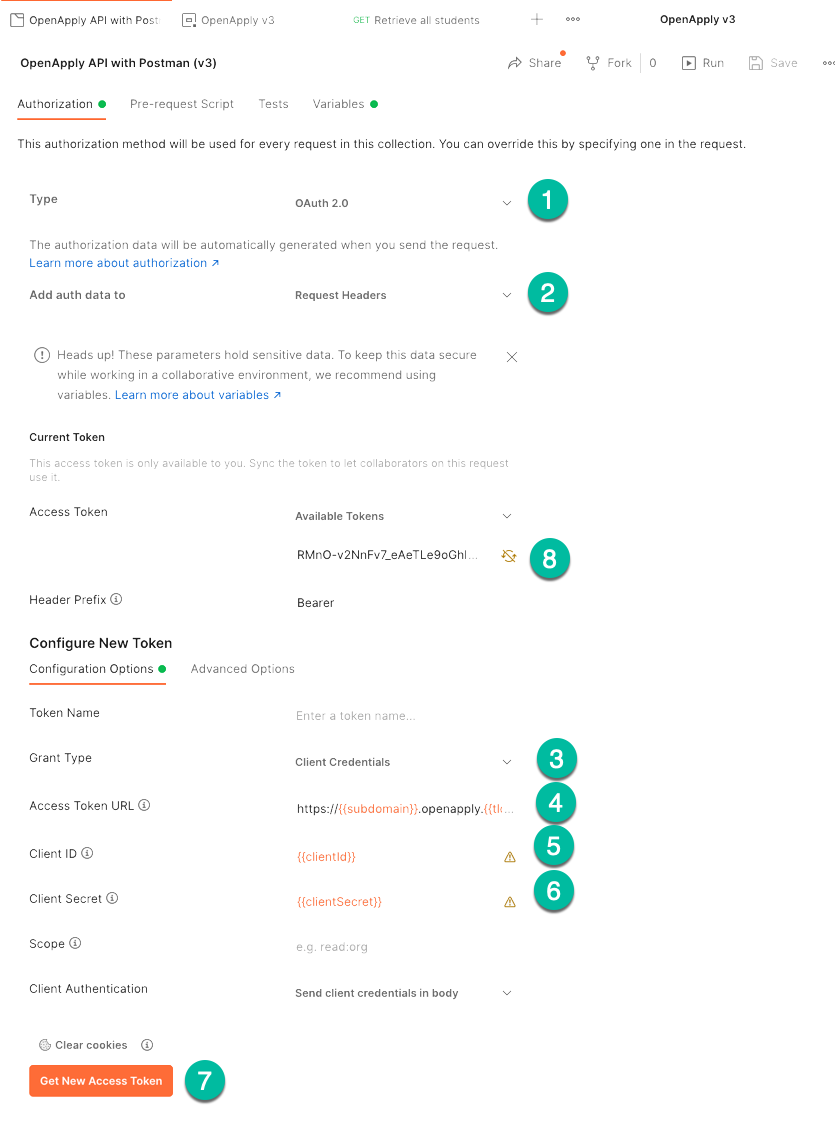
Select the collection of Open Apply endpoints and open the Authorization tab.
1. Select authentication type **Oauth 2.0**
2. Add auth Data to **Request Headers**
3. Scroll down to **Configuration Options** under **Configure New Token.** Select **Client Credentials.**
4. Enter the **Access Token URL**. If you just want to access your school’s Open Apply API, you can just use your URL in the below format. In the example given, we use variables and add the base URL values to an environment instead. This keeps all access information stored separately so that it cannot be exported with the collection and shared accidentally.
**https\://{{subdomain}}.openapply.{{tld}}/oauth/token**
E.g.,
The variables are defined on the **Variables** tab of the **Collection** page and later in the **Environment** as well:
Notice that the **baseUrl** has a pattern similar to the access path for the OAuth token, but instead of /oauth/token at the end, remove oauth/token and replace it with **/api/v3**.
**Collection:**
**Environment:**
5. & 6. It is most important to define the Client ID and Secret as variables and store these in an environment so that no authentication information is stored in the collection. This example shows the school with baseUrl: ****
6. Click **Get New Access Token** to generate a new access token.
7. The token will automatically be saved in the Bearer token section. This token lasts for 30 days and can be refreshed at any time by clicking **Get New Access Token.**